In part 1 I went through the basics of setting up the canvas and adding a simple sprite to it. Then part 2 got through handling keyboard controls and animating the hero character. Most recently, part 3 added some scenery objects and the basics of collision detection. We now are to a point where we can leverage the framework we’ve created to add in some bad guys to roam around the canvas. We’ll make some modifications to our heroObject in order to allow it to accommodate NPC characters as well as the player controlled hero. Because I’m all for clichés I’ll be using the same sprite we used for the hero character…only making it evil.

We’ll start off with similar functionality that we used for our rock objects in part 3 and add a variable at the top for the number of bad guys we want to have on the screen at one time, an array to hold them all and a base image object to hold the sprite image.
1 2 3 4 5 6 | // variable to determine how many enemies to draw into the scene var numEnemies = 10; // array to hold all of the enemy objects we have var enemies = new Array(); // variable to hold our base enemy image var baseEnemy = null; |
The next part is to create an initEnemies function that will combine elements of the initRocks and the initHero functions. For each enemy we want to create we have to make sure it doesn’t collide with the hero and also that it doesn’t collide with any of the rocks that are on the scene.
1 2 3 4 5 6 7 8 9 10 11 12 13 14 15 16 17 18 19 20 21 22 23 24 25 26 27 28 29 30 31 32 33 34 35 36 37 38 39 40 41 42 43 44 45 46 47 | function initEnemies() { // Set up the base enemy Image object // and load in the correct image we want to use baseEnemy = new Image(); baseEnemy.src = "images/Evil_Mage_Sprite.png"; // once it has loaded into memory we loop through // and create a new heroObject and set the image to our base baseEnemy.onload = function() { for (var i = 0; i < numEnemies; i++) { // we have to make sure the enemy is not drawn on top of the hero // or on top of a rock do { // this creates the enemy which we set up to have a random // x and y coordinate enemies[i] = new heroObject(); // check if we have a hero collision, if so we recreate the enemy if (enemies[i].checkCollision(hero)) enemies[i].collision = true; else { // if it didn't collide with the hero, check to make sure it doesn't collide // with any of the rocks for (curRock in rocks) { if (enemies[i].checkCollision(rocks[curRock])) { // if it collides with a rock, break out of the for loop and recreate the enemy enemies[i].collision = true; break; } } } } while (enemies[i].collision); // use the baseEnemy object as our image enemies[i].image = baseEnemy; // render it to the baseContext enemies[i].render(); } } } |
We need to make a call to the in the game loop:
1 2 3 4 5 | // do a foreach type loop through the enemies for (curEnemy in enemies) { enemies[curEnemy].render(); } |
At this point you should be able to run the game and have a screen with pseudo-randomly placed rocks and bad guys with none of them stacking on top of the other. The next piece will be to adjust the value randomly to one of the 4 valid directions.
1 2 3 4 5 6 7 8 | // use the baseEnemy object as our image enemies[i].image = baseEnemy; // set the enemy to be moving a random direction at the start enemies[i].keys[0] = Math.floor(Math.random() * 4) + 37; // render it to the baseContext enemies[i].render(); |
Before that change will make any difference we need to modify the game loop so that before it renders out each enemy it calls the update method for it
1 2 3 4 5 6 7 8 | // do a foreach type loop through the enemies for (curEnemy in enemies) { // Update the enemy based upon how long it took for the game loop enemies[curEnemy].update(elapsed / timerRatio); // draw the enemy to the screen again enemies[curEnemy].render(); } |
Running the game at this point you’ll notice that the enemies are basically very poorly developed roombas and will just walk in a single direction until they hit a rock and then they just repeatedly slam their heads into it(luckily, reusing the heroObject means they already have our collision detection logic without having to do anything additional). We’ll slightly upgrade their AI and allow them to turn away from a rock any time there is a collision. This is also done in the game loop after the call to the update method, and before the call to the render method.
1 2 3 4 5 6 7 8 9 10 11 12 13 | // do a foreach type loop through the enemies for (curEnemy in enemies) { // Update the enemy based upon how long it took for the game loop enemies[curEnemy].update(elapsed / timerRatio); // check if the enemy collided with a rock, if it did turn it a random direction if (enemies[curEnemy].collision) enemies[curEnemy].keys[0] = Math.floor(Math.random() * 4) + 37; // draw the enemy to the screen again enemies[curEnemy].render(); } |
This works well enough for the most part, but we have an issue if one of the enemies starts walking down a path that doesn’t contain any rocks…they just keep going ad nauseum. To correct that we’ll need to add a new property to the heroObject and then another test inside the game loop for the enemies (again, before the call to render). The property we’re going to add will be called “lastKeyChange” and it will be used to check how long it’s been since the enemy last changed movement directions. We can set whatever type of limit on that we want before we force a direction change. Inside the heroObject add the property underneath the property
1 2 | // When was the last time we had a direction change? this.lastKeyChange = Date.now(); |
Then update the loop to make use of that property
1 2 3 4 5 6 7 8 9 10 11 12 13 14 15 16 17 18 19 20 21 22 23 | // do a foreach type loop through the enemies for (curEnemy in enemies) { // Update the enemy based upon how long it took for the game loop enemies[curEnemy].update(elapsed / timerRatio); // check if the enemy collided with a rock, if it did turn it a random direction if (enemies[curEnemy].collision) { enemies[curEnemy].keys[0] = Math.floor(Math.random() * 4) + 37; enemies[curEnemy].lastKeyChange = Date.now(); } // if the enemy has gone a while without changing directions, turn it a random direction if (now - enemies[curEnemy].lastKeyChange > ((Math.random() * 3000) + 5000)) { enemies[curEnemy].keys[0] = Math.floor(Math.random() * 4) + 37; enemies[curEnemy].lastKeyChange = Date.now(); } // draw the enemy to the screen again enemies[curEnemy].render(); } |
At this point you should be able to run the game and have all the randomly placed rocks from before in addition to the new enemy mages wandering around on the screen bouncing off the rocks and pseudo-randomly changing directions. The next part of the series will get into allowing the hero to throw fireballs to kill the enemy mages and adding in some point tracking for the game.
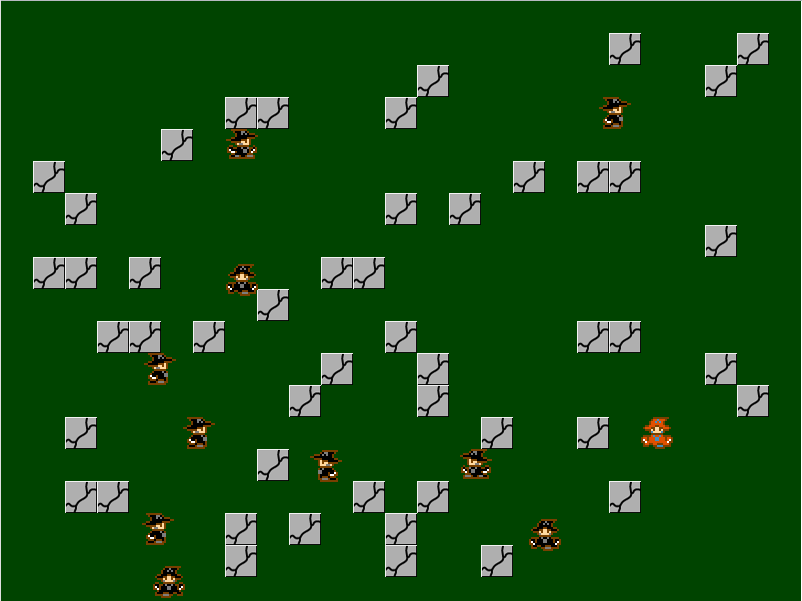
Here’s the link to the demo for this code.