Finally we get to part 6 of the game creation tutorial / learning endeavor. Reality conspired against me to cause this post to be delayed, but I got here all the same. Today we’re going to dig into creating goodness, gracious great balls of fire for our hero to throw around in a devil-may-care fashion. The image we’ll be using for our fireball sprite is one I found somewhere ages ago (honestly, no clue when or where I got it) and slightly modified to meet the needs of this game. It follows the same pattern as our other animate sprite (for the hero / villains) and is just a sequence of “keyframes” for the sprite with a transparent background.

Several of the pieces for the fireball object will be directly duplicated from our hero object (because, really, fireballs and people share, like, 95% of the same DNA sequences). We will have one main new concept that will be introduced: destroying / recreating an object. We want to ensure that when our fireball hits a wall, enemy or the edge of the world it is destroyed to free up the memory allocated for it (and to make sure invisible fireballs don’t keep roaming around all higgledy-piggledy).
As I mentioned, the fireball object is going to be almost identical to the hero object. We’ll adjust the width and height to be 16 instead of 32, change the speed a little and (the biggest change) give it a destroyed property that will be set to true when it goes off the screen:
1 2 3 4 5 6 7 8 9 10 11 12 13 14 15 16 17 18 19 20 21 22 23 24 25 26 27 28 29 30 31 32 33 34 35 36 37 38 39 40 41 42 43 44 45 46 47 48 49 50 51 52 53 54 55 56 57 58 59 60 61 62 63 64 65 66 67 68 69 70 71 72 73 74 75 76 77 78 79 80 81 82 83 84 85 86 87 88 89 90 91 92 93 94 95 96 97 98 99 100 101 102 103 104 105 106 107 108 109 110 111 112 113 114 115 116 117 118 119 120 121 122 123 124 125 126 127 128 129 130 131 132 | function fireball() { // The width and height of the sprites for our fireball this.width = 16; this.height = 16; // When our fireball is first created is in null land // we assign a location based upon where the hero is this.x = null; this.y = null; // An array to hold the information about which keyboard keys are pressed this.keys = new Array(); // When was the last time we drew the fireball to the screen this.lastRender = Date.now(); // What delay do we want to use between switching sprites (in milliseconds) this.animSpeed = 100; // What image are we using for the hero this.image = new Image(); // Which sprite in the image are we currently rendering this.whichSprite = 0; // How many pixels do we want to move the fireball each loop this.moveSpeed = 7; // Do we have a collision event? this.collision = false; // When was the last time we had a direction change? this.lastKeyChange = Date.now(); // Do we need to destroy the fireball? this.destroyed = false; this.render = function() { // drawImage takes for parameters: // the image to draw // the x and y coordinates to use from the source image // the width and height to use from the source image // the x and y coordinates to draw it to on the canvas // the width and height to draw it into on the canvas context.drawImage(this.image, this.whichSprite, 0, this.width, this.height, this.x, this.y, this.width, this.height); }; this.checkCollision = function(obj) { // check to see if our x coordinate is inside the object and // our y coordinate is also inside the object // Adjust these to give 1 full pixel lenience due to canvas allowing // partial pixel rendering if ((this.x < (obj.x + obj.width - 1) && Math.floor(this.x + this.width - 1) > obj.x) && (this.y < (obj.y + obj.height - 1) && Math.floor(this.y + this.height - 1) > obj.y)) { return true; } }; this.update = function(elapsed) { // store out the current x and y coordinates var prevX = this.x; var prevY = this.y; // reset the collision property this.collision = false; var now = Date.now(); // How long has it been since we last updated the sprite var delta = now - this.lastRender; // perform a switch statement on the last key pushed into the array // this allows us to always move the direction of the most recently pressed // key switch (this.keys[this.keys.length - 1]) { case 37: // move the fireball left on the screen this.x -= this.moveSpeed * elapsed; // Check if the animation timer has elapsed if (delta > this.animSpeed) { this.whichSprite = this.whichSprite == 0 ? 16 : this.whichSprite == 16 ? 32 : this.whichSprite == 32 ? 48 : 0; this.lastRender = now; } break; case 38: // move the fireball up on the screen this.y -= this.moveSpeed * elapsed; // Check if the animation timer has elapsed if (delta > this.animSpeed) { this.whichSprite = this.whichSprite == 0 ? 16 : this.whichSprite == 16 ? 32 : this.whichSprite == 32 ? 48 : 0; this.lastRender = now; } break; case 39: // move the fireball right on the screen this.x += this.moveSpeed * elapsed; // Check if the animation timer has elapsed if (delta > this.animSpeed) { this.whichSprite = this.whichSprite == 0 ? 16 : this.whichSprite == 16 ? 32 : this.whichSprite == 32 ? 48 : 0; this.lastRender = now; } break; case 40: // move the fireball down on the screen this.y += this.moveSpeed * elapsed; // Check if the animation timer has elapsed if (delta > this.animSpeed) { this.whichSprite = this.whichSprite == 0 ? 16 : this.whichSprite == 16 ? 32 : this.whichSprite == 32 ? 48 : 0; this.lastRender = now; } break; } // Logic to see if we're going off the screen // If we do we are destroyed if (this.x < -this.width) { this.destroyed = true; } if (this.x >= renderW) { this.destroyed = true; } if (this.y < -this.height) { this.destroyed = true; } if (this.y >= renderH) { this.destroyed = true; } }; } |
Much like we did for the enemies and the rocks, we’re going to need a base fireball object that we will load the image into in order to speed things along as we are playing. At the top, underneath
1 2 3 4 5 | we'll add in: <pre class="lang:js decode:true"> // variable to hold our base fireball image var baseFireball; |
And we need a new function to initialize the base fireball object (it’s actually only two lines of code, but we’re doing it for consistency since we did it for all the other objects):
1 2 3 4 5 | function initFireball() { baseFireball = new Image(); baseFireball.src = "images/fireballs.png"; } |
Now just add a call to
1 2 3 4 5 6 7 8 9 | . Once we know what a fireball is and have the base all set, we're going to make it up so that our hero is only allowed to have one active fireball in play at a given time. We'll start off by just adding a new property to our hero object called "activeFireball" and a boolean "shooting" variable. Inside our <pre class="lang:js decode:true"> add: <pre class="lang:js decode:true"> // Do we have an active fireball in play? this.activeFireball = null; // Rather than using the keys array for fireballs, we'll just have a boolean this.shooting = false; |
Now we’ll make a slight adjustment to our key capture logic to trap a press of the spacebar (we’ll add logic into our hero later to check for this in order to Hadouken!). At the top of the keydown and keyup handlers we’ll add a check to see if the spacebar was pressed. This is the code for the keydown event, the keyup event is the same code except we set the value to false:
1 2 3 | // check if the spacebar is being pressed if (event.keyCode == 32) hero.shooting = true; |
Now we’re all set capturing the spacebar (why the spacebar, you may ask? Because that’s what it always seems to be in games, just accept it). The next piece is to adjust our hero update method to check for the spacebar being pressed and, if it is, start up a fireball object. This code will go inside the update method, just above the switch statement for the hero movement:
1 2 3 4 5 6 7 8 9 10 11 12 13 14 15 16 17 18 19 20 21 22 23 24 25 26 27 28 29 30 31 32 33 34 35 36 37 38 39 40 41 42 | // check to see if the spacebar is being pressed if (this.shooting) { // check to make sure we don't currently have a fireball in play if (this.activeFireball == null) { // create a new fireball inside our hero object this.activeFireball = new fireball(); // set the image to use the base fireball we loaded this.activeFireball.image = baseFireball; // check which way our hero is facing, we use this to determine // where we position the fireball, which direction the fireball // has to move and which set of 4 sprites we use if (this.whichSprite < this.width * 2) { this.activeFireball.keys[0] = 40; this.activeFireball.x = this.x + (this.width / 4); this.activeFireball.y = this.y + this.height; } else if (this.whichSprite < this.width * 4) { this.activeFireball.keys[0] = 37; this.activeFireball.x = this.x; this.activeFireball.y = this.y + (this.height / 4); } else if (this.whichSprite < this.width * 6) { this.activeFireball.keys[0] = 39; this.activeFireball.x = this.x + this.width; this.activeFireball.y = this.y + (this.height / 4); } else { this.activeFireball.keys[0] = 38; this.activeFireball.x = this.x + (this.width / 4); this.activeFireball.y = this.y; } this.activeFireball.render(); } } |
The steps we are having the code perform are: check if the spacebar was just pressed — if so, remove the spacebar from the keys array (we do this because we want the movement switch to go based upon the last arrow key that was pressed) and check if the hero currently has an active fireball — if not, create a new fireball object and position it based upon which way the hero is facing then draw it to the screen.
The last change we have to make to get our fireball moving on the screen (but not finished since it will just go on forever at this point) is to add the logic into our
1 2 3 4 5 6 7 8 9 10 11 12 13 14 15 16 | : <pre class="lang:js decode:true"> // if the hero has a fireball, render it if (hero.activeFireball != null) { // Update the fireball based upon how long it took for the game loop hero.activeFireball.update(elapsed / timerRatio); // if our fireball was destroyed in the last update, remove it // otherwise draw it to the screen if (hero.activeFireball.destroyed) hero.activeFireball = null; else hero.activeFireball.render(); } |
When you run the code at this point you should be able to press the spacebar and have it shoot off a fireball. The fireball will be destroyed when it goes off the screen allowing you to shoot another. At the moment, the fireballs will pass right through the rocks and enemies and that just will NOT do! We’ll fix that glaring oversight by adding calls to the collisionCheck inside the fireball update method. For the rocks we’ll take the code we already have in place within the hero object that loops through and checks for collisions. We need to make a small tweak to it so that it tells the fireball to bugger off when it has a collision
1 2 3 4 5 6 7 8 9 10 11 12 13 14 15 | // loop through all of the rocks in the array // we use an for-in loop to go through the rocks in case // we later add some logic that can destroy static objects // a regular for loop could break with null values if that happens for (iter in rocks) { // check to see if we have a collision event with the // current rock if (this.checkCollision(rocks[iter])) { // we hit a rock, we need to destroy the fireball this.destroyed = true; break; } } |
Great, now we can toss fireballs around the map and have them be destroyed when they go off screen or hit a rock. Of course, the REAL fun comes from being able to shoot the enemies. To accommodate the need for wanton destruction and the killing of cute, onscreen pixels, we need to add a new property into our heroObject (remember the heroObject is used for both the hero and the enemies). Right below the
1 2 3 4 5 | line we added earlier we'll add in <pre class="lang:js decode:true"> // Did we get hit by a fireball and need to be destroyed? this.destroyed = false; |
Next step is adjusting the fireball update method to also iterate through all of the enemies to check for a collision. We’ll add this code after the loop through all of the rocks:
1 2 3 4 5 6 7 8 9 10 11 12 13 14 15 16 17 | // loop through all of the enemies in the array // we use an for-in loop to go through the enemies in case // we later add some logic that can destroy an enemy objects // a regular for loop could break with null values if that happens for (iter in enemies) { // check to see if we have a collision event with the // current enemy if (this.checkCollision(enemies[iter])) { // we hit an enemy, we need to destroy the fireball // and the enemy this.destroyed = true; enemies[iter].destroyed = true; break; } } |
That tells it to destroy both the enemy AND the fireball when we have a collision between the two. We have one final piece of the puzzle and that is to update the gameLoop to have it remove the enemy from the game if it is destroyed. We’ll replace the foreach loop through the enemies within the gameLoop with the following:
1 2 3 4 5 6 7 8 9 10 11 12 13 14 15 16 17 18 19 20 21 22 23 24 25 26 27 28 29 30 | // do a foreach type loop through the enemies for (curEnemy in enemies) { if (enemies[curEnemy].destroyed) { enemies.splice(curEnemy, 1); } else { // Update the enemy based upon how long it took for the game loop enemies[curEnemy].update(elapsed / timerRatio); // check if the enemy collided with a rock, if it did turn it a random direction if (enemies[curEnemy].collision) { enemies[curEnemy].keys[0] = Math.floor(Math.random() * 4) + 37; enemies[curEnemy].lastKeyChange = Date.now(); } // if the enemy has gone a while without changing directions, turn it a random direction if (now - enemies[curEnemy].lastKeyChange > ((Math.random() * 3000) + 5000)) { enemies[curEnemy].keys[0] = Math.floor(Math.random() * 4) + 37; enemies[curEnemy].lastKeyChange = Date.now(); } // draw the enemy to the screen again enemies[curEnemy].render(); } } |
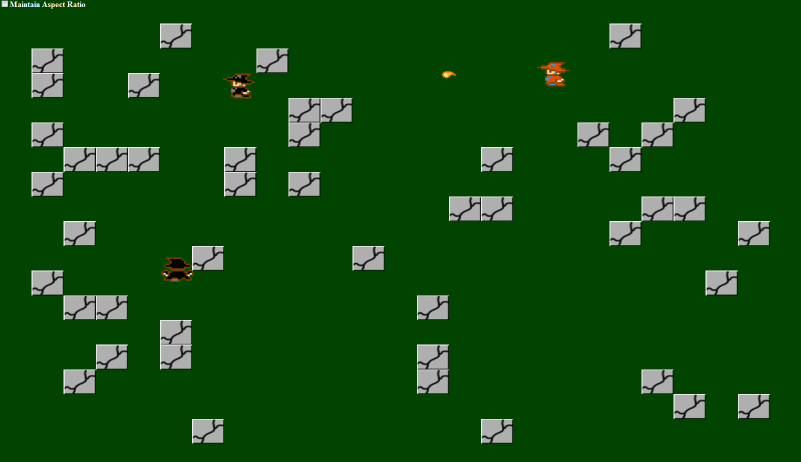
And that does it. You can know wield flaming balls of death (well flaming ball of death since you can only have one at a time) that will destroy enemies and disappear off the screen. This post covered a fairly large amount of changes, so if anything doesn’t make sense feel free to let me know. Here’s a screenshot of a fireball in action.
And, as always, the link to the demo for this code